
Skip to content
Free SSL and free migration on all hosting plans (21) 2042-0058 WhatsApp Support
EN
  • Português (Brasil)
  • Português (Portugal)
  • English
  • Español
Loja Sideral
  • Web hosting

    Web hostingPlans with Plesk panel, free SSL and daily backup WordPress hostingEnvironment optimized for your WordPress Linux hostingPHP, MySQL and many more features

    Websites and stores

    Website builderBuild your website without coding Online storeStart selling online today Delivery systemReceive online orders for your business Google AdWords6 plans available
    No cost

    Free migration

    Already have a site with another host? We move it for you, hassle-free.

    I want to migrate
  • Domains

    Domain registrationSearch, register or transfer your domain How to choose a nameTips to get your website address right Registration billingUnderstand terms and renewal

    Email

    Professional emailEmail accounts with your company domain
  • Protect your business

    SSL certificatesEncryption and trust for your customers SiteLockMalware scanning and removal CodeGuardAutomatic backups and monitoring
  • Talk to us

    Support center24h tickets and chat during business hours ContactSales and billing questions

    Aprenda e fique por dentro

    Help CenterTutoriais e respostas rápidas NewsNovidades e avisos DownloadsProgramas e arquivos

    Company

    The companyConheça a Loja Sideral What is my IPFind out your IP address
Sign in
Home » Support » Help Center » Como configurar programas de transmissões de rádio ao vivo » Como transmitir em MP3 com o SimpleCast
Tutoriais e respostas

Como transmitir em MP3 com o SimpleCast

Suporte da Loja Sideral

Help Center

  • News
  • Help Center
  • Downloads
  • Falar com o suporte

Como configurar programas de transmissões de rádio ao vivo · Atualizado em 12/10/2026

IMPORTANTE:

– O SimpleCast realiza transmissões exclusivamente em MP3. Para transmissões em AAC Plus recomendamos o OddCast V3;

– Certifique-se de que seu AUTO DJ esteja configurado corretamente em MP3 para que a transição entre sua transmissão AO VIVO e sob demanda ocorra normalmente. Utilize no SimpleCast exatamente as mesmas configurações de transmissão utilizadas em seu AUTO DJ;

Abra o SimpleCast, e a seguinte tela será exibida:
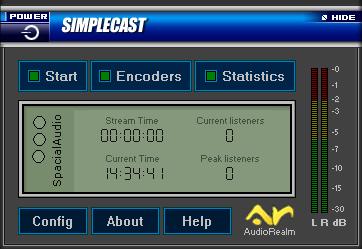


Clique em “Config” para que a tela de configurações seja exibida:
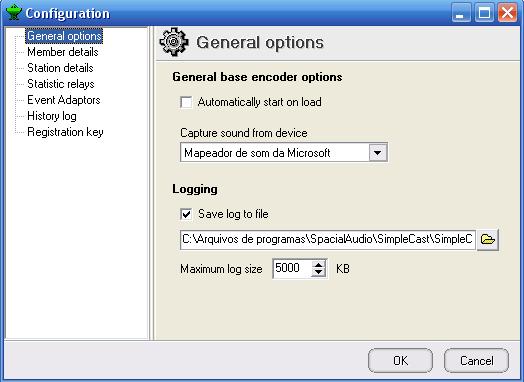


Selecione a opção “Automatically start on load“.
Em “Capture sound from device“, selecione sua placa de som, e clique em “OK“.

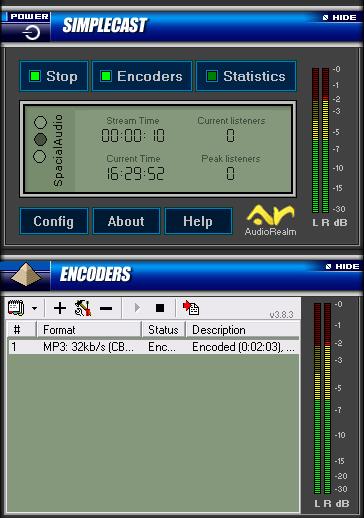
Na página principal de seu SimpleCast, clique no botão “Encoders“:
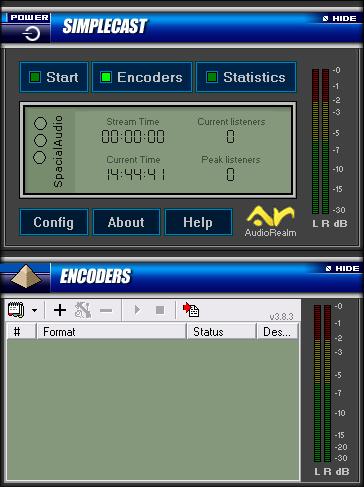


Clique no botão “+” para dar início a configuração do Encoder de sua web rádio. Uma nova tela será exibida:
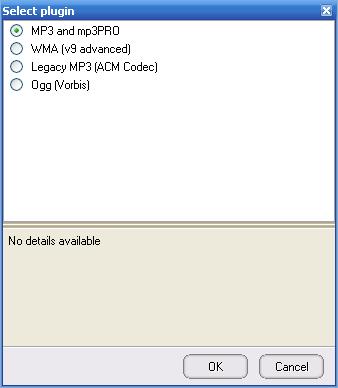


Selecione “MP3 and mp3PRO” e clique em “OK“. Nesta nova tela, será configurada a qualidade de transmissão:
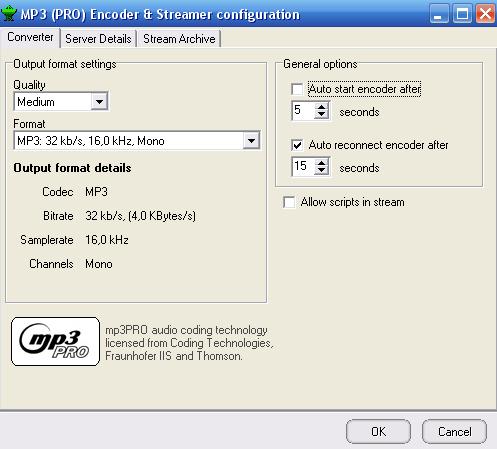


– Quality: Medium;
– Format: Selecione o bitrate(qualidade) de sua web rádio;

Clique na aba “Server Details“:
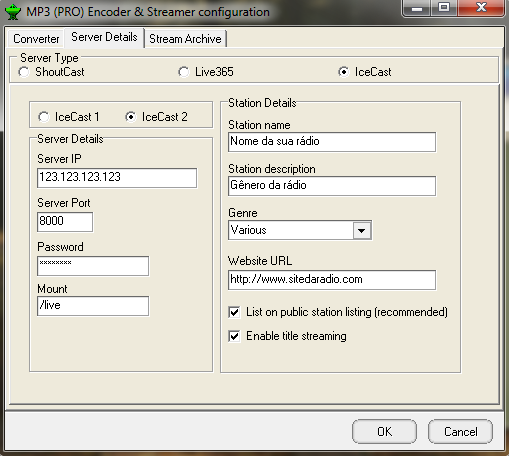


Nesta tela iremos configurar os dados de sua web rádio, disponíveis em seu sistema:

– Server Type: Selecione IceCast e IceCast2 logo abaixo;
– Server IP: Digite o endereço de seu streaming;
– Server Port: Digite a porta de seu streaming;
– Password: Digite sua senha de transmissão;

Os campos abaixo são opcionais, e servem para identificação de sua web rádio:

– Station name: Digite o nome de sua web rádio;
– Genre: Digite o gênero de sua web rádio;
– Website URL: Digite o endereço do site de sua web rádio;
– AIM: Digite o endereço de seu AOL Instant Messenger;
– ICQ: Digite seu endereço ICQ;
– IRC Channel: Digite o endereço de seu canal no IRC.

Marque as opções “List on public station listing” e “Enable title streaming“.

Após preencher todos os campos, clique em “OK“.

Pronto, a configuração do Encoder de sua web rádio com o programa SimpleCast foi finalizada!
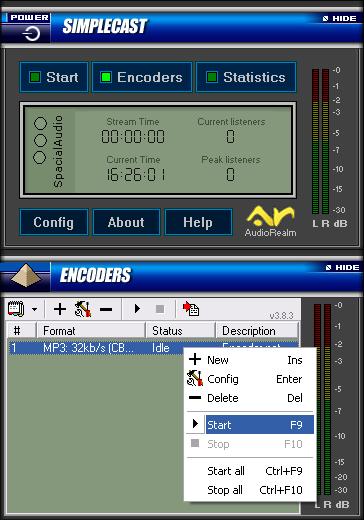
Para iniciar a transmissão de sua web rádio clique com o botão direito em cima do Encoder recém adicionado e clique em “Start“, ou simplesmente aperte a tecla “F9“:


Ao conectar será exibida a mensagem “Encoded” com o tempo de transmissão ao lado, entre parênteses:
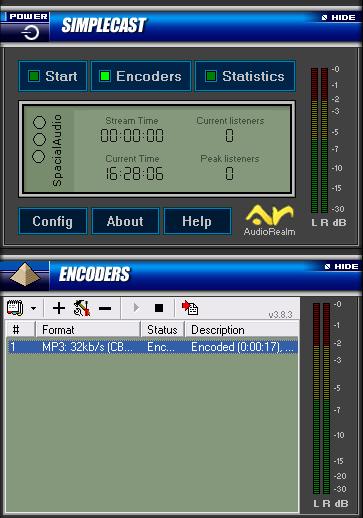


Para iniciar a captação de áudio clique no botão “Start” na página principal do SimpleCast.
Após este procedimento o áudio de sua web rádio será transmitido para todos os seus ouvintes!


O SimpleCast também permite a configuração de estatísticas de audiência para sua web rádio.


Não resolveu? Open a ticket ou fale com a gente.

Related articles

  • ZaraRadio em português (PT-BR)
  • Como adicionar a rádio no TuneIn
  • Como adicionar sua rádio no aplicativo RadiosNet
  • Como configurar a web rádio com o VoiceMeeter
  • Como configurar o ZaraRadio com uma placa de som virtual

Need more information about our services?

Talk to our specialized support and get the best service.

Falar com a Loja Sideral

Sobre a Loja Sideral

Solutions for internet professionals, with all the knowledge gained from years of experience in IT.

Products

  • Web hosting
  • Online store
  • Domain registration
  • Professional email
  • SSL certificates
  • Website builder

Support

  • Customer center
  • Help Center
  • News
  • Downloads
  • Tickets
  • My IP

Contact

Sideral Host
R P Penedo ME
Rua Sá Carvalho, 51 - Sobrado - Brasilândia - São Gonçalo - RJ - 24440-710
CNPJ: 31.951.569/0001-66
(21) 2042-0058
financeiro@sideralhost.com.br
comercial@sideralhost.com.br

Payment methods Secure site

© 2026 Sideral Host. All rights reserved. Terms of service Privacy Anti-spam Postmaster Unlimited policy Legal notices

Unlimited resources policy

What is unlimited transfer?

Transfer, or bandwidth, is the amount of data that moves between your account and our server each month.

Our servers and data centers run on high-end technology, with great processing capacity to support heavy traffic demands and let you enjoy unlimited transfer for your site.

However, it is important to know that the term ‘unlimited transfer’ means ‘transfer with no defined amount’, since every service provided on the internet obviously has physical capacity limits.

When we detect a site in these conditions, we analyze the reasons for the excessive consumption and suggest the most suitable fixes, whether by migration, code optimization and so on.

So, to enjoy our resources in a healthy way and without surprises, we recommend that all our customers carefully read our Terms of Service and follow the resource usage criteria.

Contact us

We use cookies to improve your experience and measure site usage. Learn more in our Privacy Policy.